- Click the Connect to Zoom Room image above
- You will be prompted to ‘launch the application’ to start (It will be installed if needed)
- Once ZOOM starts, keep in mind, you are in the main East Coast Reflector (ECR) ZOOM Room
- You are more than welcome to chat with anyone But “The Godfather” Dick, WB2JPQ, has created a South Coast Reflector (SCR) – Break Out Room. Just for us to use.
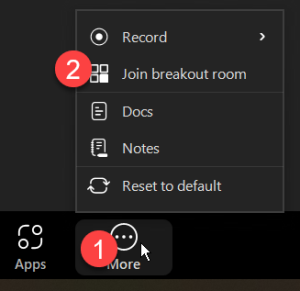
- On the bottom right of the screen, you will need to click on the “More” Button, and then click “Join breakout room”
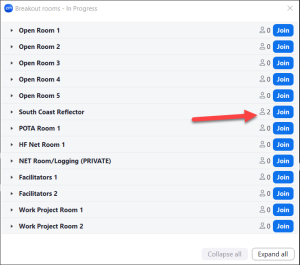
- “Breakout Rooms – In Progress” window will pop up
- Look for “South Coast Reflector“, and click “Join“
- Once in the SCR Break Out Room, you have meeting controls
- Enable / disable microphone
- Enable / disable video
- Share screens
- Leave Room
- Click the Connect to Zoom Room image above
- You will be prompted to ‘launch the application’ to start (It will be installed if needed)
- Once ZOOM starts, keep in mind, you are in the main East Coast Reflector (ECR) ZOOM Room
- You are more than welcome to chat with anyone But “The Godfather” Dick, WB2JPQ, has created a South Coast Reflector (SCR) – Break Out Room. Just for us to use.
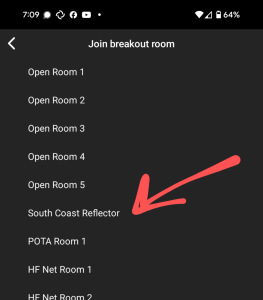
- On the top-left of the screen, click on the “Breakout room” button.
- “Join breakout room” window will pop up
- Look for “South Coast Reflector”, and click “Join”
- Once in the SCR Break Out Room, you have meeting controls
- Enable / disable microphone
- Enable / disable video
- Share screens
- Leave Room